Whatnot Tools and Whatnot Apps: The Hand-Checked Directory for Whatnot Sellers

If you sell live on Whatnot, your business quietly runs on a stack of small tools: one app to crosslist your inventory, one to print labels after the show, one to tell you whether the show actually made a profit. The problem was never that these tools don’t exist. The problem is that, until recently, you found them by accident — a mention in a Reddit thread here, a link dropped in a Discord server there.
That is exactly the gap WhatnotApps (whatnotapps.com) — a new directory built purely to collect the best Whatnot tools and Whatnot apps in one place — was built to close — and it’s why the directory has been spreading fast through Whatnot seller circles in recent weeks. Here’s what it is, how it works, and the listings worth your time.
What Is WhatnotApps?
WhatnotApps is an independent directory of apps, tools and services for people who sell on Whatnot, the live shopping platform where sellers run live auctions and shows across 250+ categories — from trading cards and sneakers to comics, coins and vintage.
At the time of writing, the directory lists 33 hand-reviewed tools. Every listing gets its own page with a plain-language description, key features, who it is for, and — unusually for a directory — a price that is checked by hand against the maker’s own site and dated. Each page also links its sources, so you can verify any claim in one click.
One clarification the site makes upfront: it is not affiliated with, endorsed by, or sponsored by Whatnot Inc. “Whatnot” is used only to describe what the listed tools work with.
Why Sellers Are Talking About It Now
Live shopping keeps growing, and Whatnot’s seller base with it — but Whatnot has no official app store for the third-party tools sellers depend on. Shopify merchants have the Shopify App Store; Whatnot sellers had word of mouth.
WhatnotApps is becoming the default answer to the most common question in seller communities — “what do you use for…?” — for three reasons:
- It is organized by job, not by name. You don’t need to know a tool exists to find it. You start from the task: shipping, profit tracking, crosslisting.
- Listings are free and placement is not for sale. Anyone can submit an app; featured picks are chosen editorially, and the site states that nobody can pay for placement today — and that if that ever changes, paid placements will be clearly labelled.
- It stays current. New tools are added every week, and a weekly email rounds up 3 new tools + 1 seller deal for sellers who don’t want to keep checking back.
The Best Whatnot Tools and Whatnot Apps, Organized by Job
The directory sorts every tool into 10 job categories, which map neatly onto a seller’s week before, during and after a show:
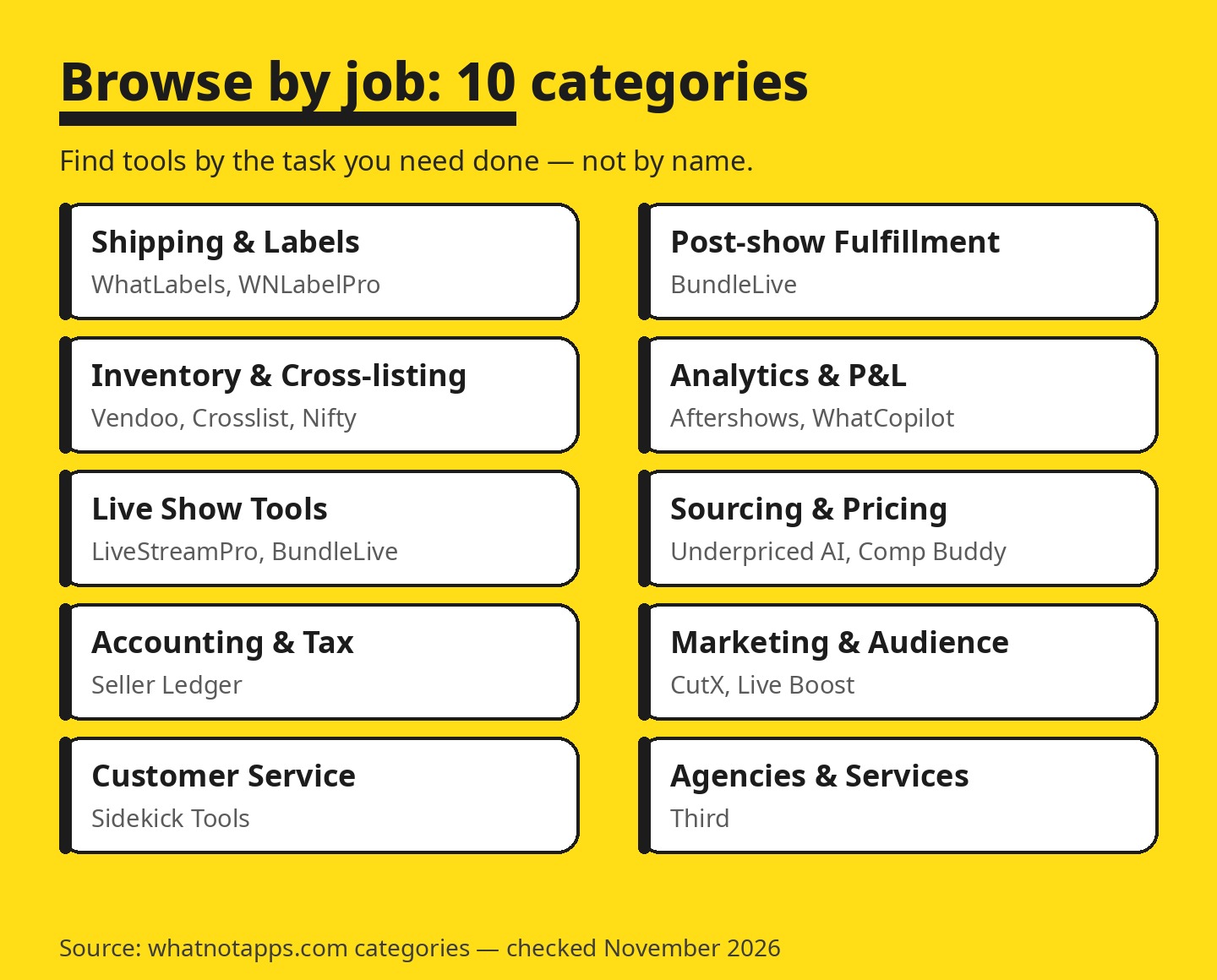
- Before the show: Sourcing & Pricing (is this card priced right?) and Inventory & Cross-listing (is my stock live everywhere it should be?)
- During the show: Live Show Tools (KPIs, giveaways, buyer CRM) and Marketing & Audience
- After the show: Shipping & Labels, Post-show Fulfillment, Analytics & P&L, and Accounting & Tax — plus Customer Service tools and Agencies & Services for sellers who would rather outsource the whole show.
9 Standout Whatnot Apps Worth a Look
Prices below are the starting prices shown on WhatnotApps, checked against the makers’ sites in November 2026.
1. Aftershows — profit per show, honestly calculated
Upload Whatnot’s Weekly Orders Report CSV, enter what each item cost you, and get profit per show, per item and per buyer after fees, refunds and seller-paid shipping. It deliberately does not use the Whatnot API — it works from the export Seller Hub already produces. From $19/month, with a free tier for two uploads.
2. Vendoo — one inventory, every marketplace
A multichannel listing manager that keeps one inventory list and pushes it to many marketplaces, pulling sales back so sold items come off the other channels. Its Whatnot integration is officially labelled beta, and sale detection on Whatnot needs your computer to stay on — the listing says so plainly. From $14.99/month.
3. Crosslist — the universal listing form
One listing form that publishes to many marketplaces, Whatnot included. A good first stop if typing the same listing five times is your current workflow. From $29/month.
4. List Perfectly — catalog-first crosslisting
One catalog to crosslist and track inventory across many marketplaces, aimed at higher-volume resellers. From $29/month.
5. ExportYourStore — two-way sync with your other stores
Two-way cross-listing and inventory sync between Whatnot and channels like eBay, Poshmark, Depop, Mercari, Etsy and Shopify, with quantity and listing-closure updates stated as landing within about 2 hours. From $29/month.
6. SellDeck — protect your other listings while you go live
Locks your eBay and Depop listings during Whatnot shows so a live sale can’t double-sell stock, and tracks show profit at the same time. The cheapest tool on this list, from $8/month.
7. Seller Ledger — tax time without the shoebox
Tax-ready bookkeeping that automatically sorts channel fees and earnings, Whatnot included — the tool sellers usually discover in January and wish they’d found in June. From $10/month.
8. WhatCopilot — a margin dashboard with an AI copilot
Feed it your CSV exports and get a margin dashboard plus an AI copilot for your shop — the newer, Whatnot-native end of the analytics category. From $29/month.
9. BundleLive — calmer post-show packing
Sorts each live buyer’s purchases into numbered bins and tracks show stats, turning the post-show packing pile into a system. From $29.99/month.
How WhatnotApps Checks Its Listings
Directories live or die on trust, so the process matters:
- Anyone can submit an app for free — name, website, tagline, categories, starting price and logo.
- Every website is checked by hand before the listing goes live; prices are checked by hand too, and the check is dated on the page.
- The “Uses official Whatnot API” badge means the maker told the directory it connects through Whatnot’s official Seller API — a useful signal when you are deciding what to trust with your shop data.
- Its own products are labelled “Built by the WhatnotApps team” and, per the site’s About page, are never pinned above others.
Built a Tool for Whatnot Sellers? You Can Get Listed
If you make software for this ecosystem, the submit form takes a few minutes and listing is free. Prepare a one-line tagline that says what job the tool does for a Whatnot seller (max 80 characters — a good discipline for your own homepage, too), your categories (up to 3), starting price, platforms, and a square logo of at least 128×128. Your email is used only to tell you when the listing is live; it is never shown publicly.
The Bottom Line
Whatnot’s tool ecosystem grew up in the comments sections of other platforms. WhatnotApps is the first attempt to give it a proper front door: 33 tools, 10 job categories, hand-checked prices, no paid placement. If you sell on Whatnot, bookmark it before your next show. (Selling on Shopify too? Our roundup of the best Shopify multi-vendor marketplace apps covers the other side of your stack.) — and if a tool you rely on is missing, submit it; that’s how directories like this get better.
Sell on Whatnot and already using a tool from the directory — or one that should be listed? Drop it in the comments; we’re keeping this article updated as new listings land.