Shopify Buy Button vs Hura Product Showcase Builder: Which Is Better for Selling Products Anywhere?

Shopify gives every merchant a free way to sell outside the online store theme: the Buy Button sales channel. It works, but it was built for one simple job, which is dropping a button or a basic product grid onto another website. If you want your products to look good inside blog posts, landing pages and partner sites, and you want to know whether those placements actually sell, you quickly run into its limits.
In this guide we test Shopify Buy Button and Hura Product Showcase Builder side by side on the same Shopify store and the same WordPress site. Every screenshot below comes from a real setup, so you can see exactly what each app gives you before you install anything.
Prefer video? Watch the full walkthrough with narration:
Quick verdict
- Shopify Buy Button is fine if you only need one product button or a simple collection grid and you do not care about layouts or statistics.
- Hura Product Showcase Builder is the better choice if you want multiple layouts (grid, list, carousel, order form), multiple product sources, built-in analytics, a cart shared with your Shopify store, and a fully customizable minishop with pagination for WordPress, Wix, Blogger or any HTML page.
Shopify Buy Button: what you get
Buy Button is a free sales channel made by Shopify. Open it and you can create either a Product Buy Button or a Collection Buy Button.

Products must be published to the Buy Button channel first
The first surprise for many merchants: products are not available to Buy Button until you publish them to that sales channel. Pick a collection whose products are not included and you get this message, and you have to go to the Products page, select the items and include them in the Buy Button channel before you can continue.

Customization
The editor has five panels: button style, layout (image size, alignment, button text, quantity field, colors and fonts), shopping cart, a detailed pop-up for single products, and advanced settings, which only cover checkout behavior (pop-up window or same tab).

How it looks on WordPress
We embedded a Collection Buy Button on a WordPress page. Products appear in one grid style with a Next page button at the bottom. There is no carousel, no list view and no order form layout.

Buy Button opens its own cart drawer. It is separate from the cart of your Shopify online store, and the drawer itself notes that discount codes are added at checkout. The app also has no view or click statistics for each embed.

Hura Product Showcase Builder: what you get
Hura Product Showcase Builder by Hura Apps does the same basic job, displaying Shopify products anywhere, but it gives you far more control over what is shown, how it looks and how it performs.
1. Three product sources
Every showcase starts from one of three sources:
- Collection showcases: show all products from a collection.
- Specific products showcases: pick any products you want, in your own order.
- Product showcases: feature a single product with a detailed layout.

With specific products you choose exactly which items appear and reorder them with drag and drop or the arrow buttons. This is ideal for “top picks” in a blog post, a gift guide or a comparison article.

2. Four display layouts: Grid, List, Carousel and Order form
Switching layouts is a single dropdown, and the live preview updates instantly for desktop, tablet and mobile. Each showcase gives you embed code for your Shopify store and a separate code for other websites.
Grid: clean product cards with sale and sold-out labels, variant selection and an Add to cart button.
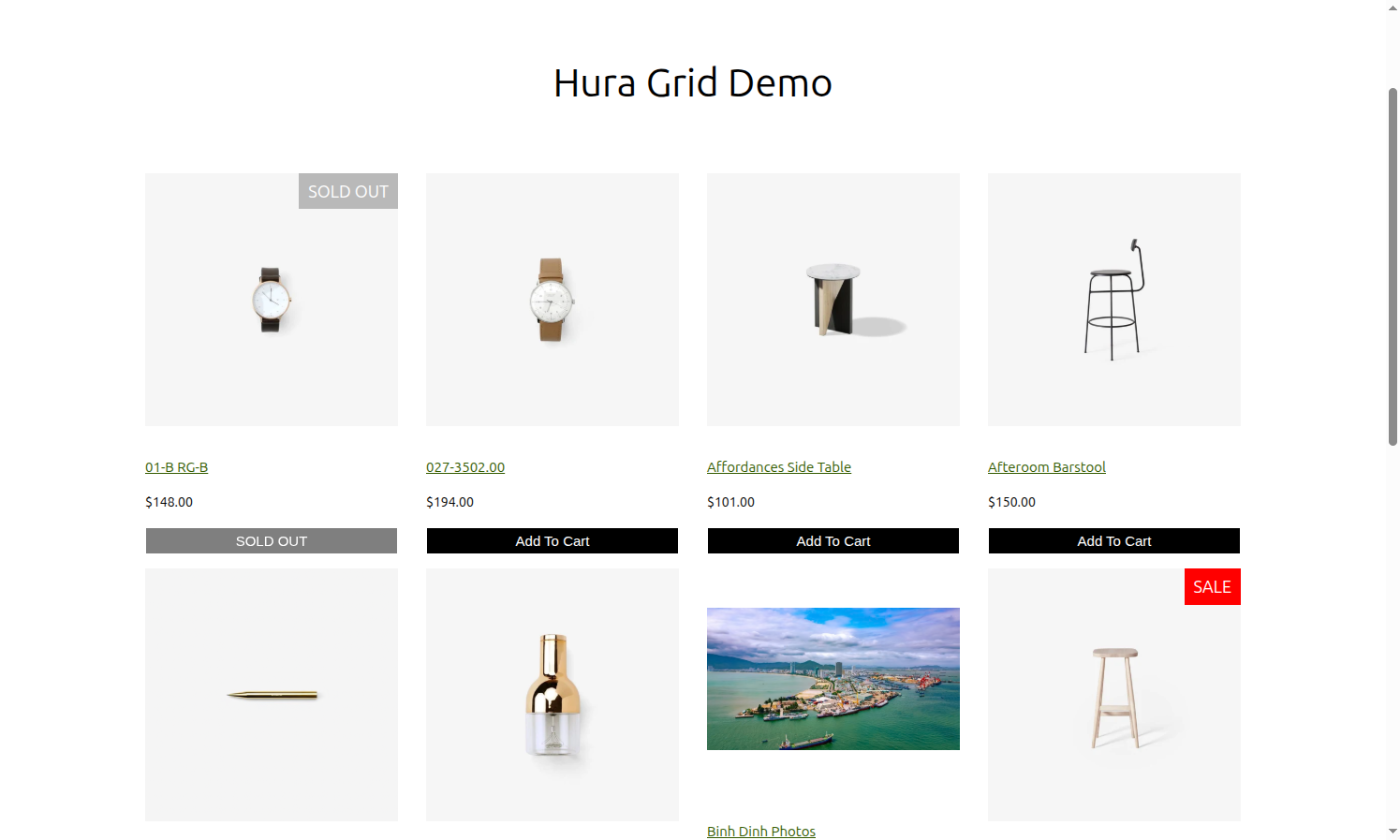
Carousel (slider): a smooth slider for featured products, new arrivals or related items.

List: larger images with room for price, description and button.

Order form: a quantity selector on every row, ideal for wholesale customers and repeat buyers.

You also control the Add to cart text, colors and font size, what happens after a product is added, the Load more button, and UTM parameters for campaign tracking.

3. On your Shopify store, it shares the store’s cart
This is where the difference really shows. When you place a Hura showcase on your own Shopify store, for example inside a blog article or a custom page, the Add to cart button uses your store’s native cart. A shopper adds a product from the showcase and it is already waiting in the same cart as everything else they picked. One cart, one checkout, no confusion.


4. Built-in analytics
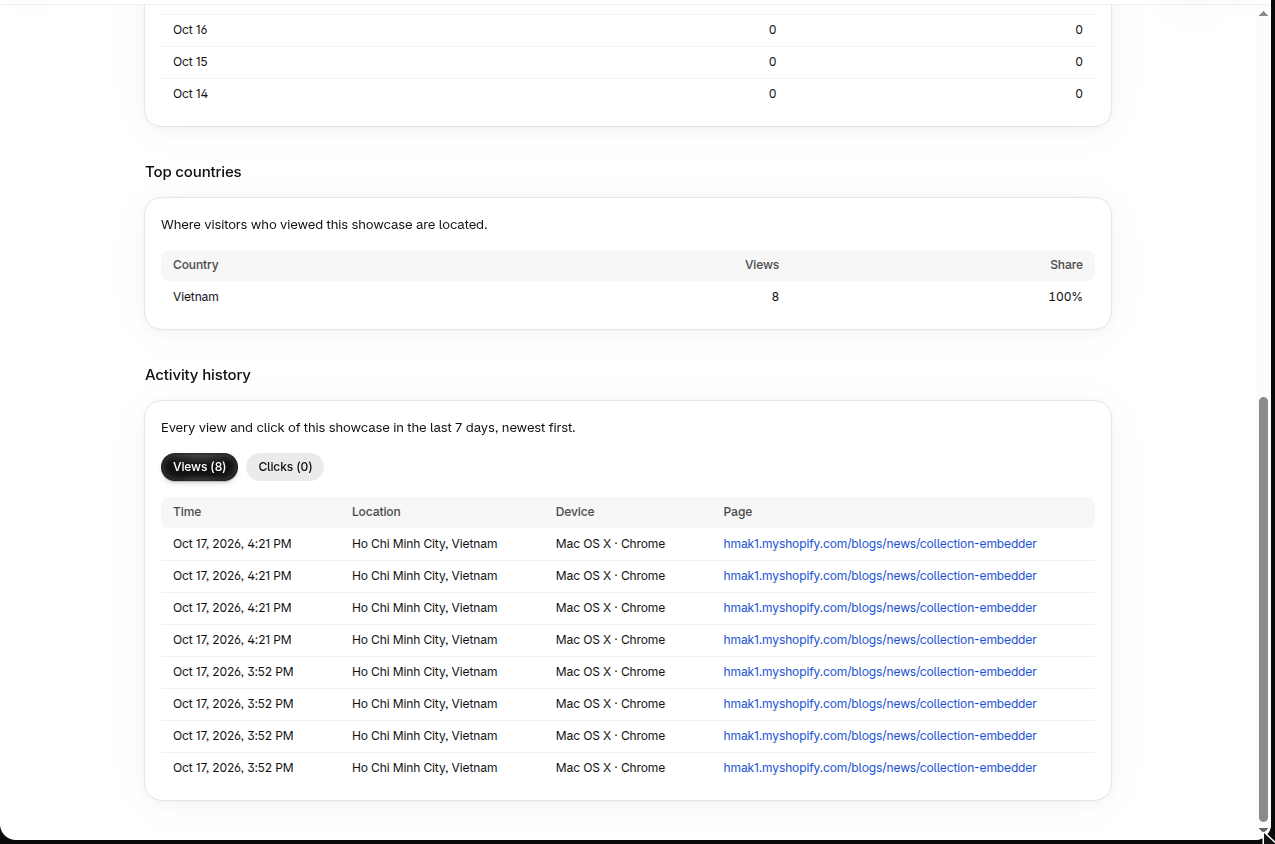
Every showcase has its own analytics page: views, clicks and click-through rate for the last 7 days, a daily chart, top countries, and an activity history that lists every view and click with time, location, device and the exact page. Now you know which blog posts and pages actually drive interest.

5. Minishop: a full mini store on any website
For WordPress, Wix, Blogger, Joomla or any HTML page, Hura Minishop embeds a complete mini store with one line of code.

It is deeply customizable:
- Display type: grid, list or bulk order form, with products per row for desktop, tablet and mobile and custom spacing.
- Product cards: style, background, border, corner radius, padding, shadow, hover effect, alignment, image ratio and image fit.
- Card content: title size, weight and max lines, price and compare-at price colors, vendor.
- Actions and quick view: open quick view or the product page, show vendor, description, variant picker and a Buy now button.
- Floating cart: position, offsets, size, colors and badge, plus every cart text.
- Market: show prices and product details for a specific country and language.

Large catalog? Minishop has pagination, so shoppers browse page by page instead of scrolling an endless list.

Clicking a product opens a quick view with the variant picker, Add to cart and Buy now.

The floating cart lets shoppers adjust quantities and apply discount codes before they go to checkout.

6. Extras: theme sections, checkout links and AI tools
Hura also includes ready-made Online Store 2.0 sections (featured product, product slider, bulk order form, bundle order form, product gallery tabs and more), direct checkout links and AI tools.

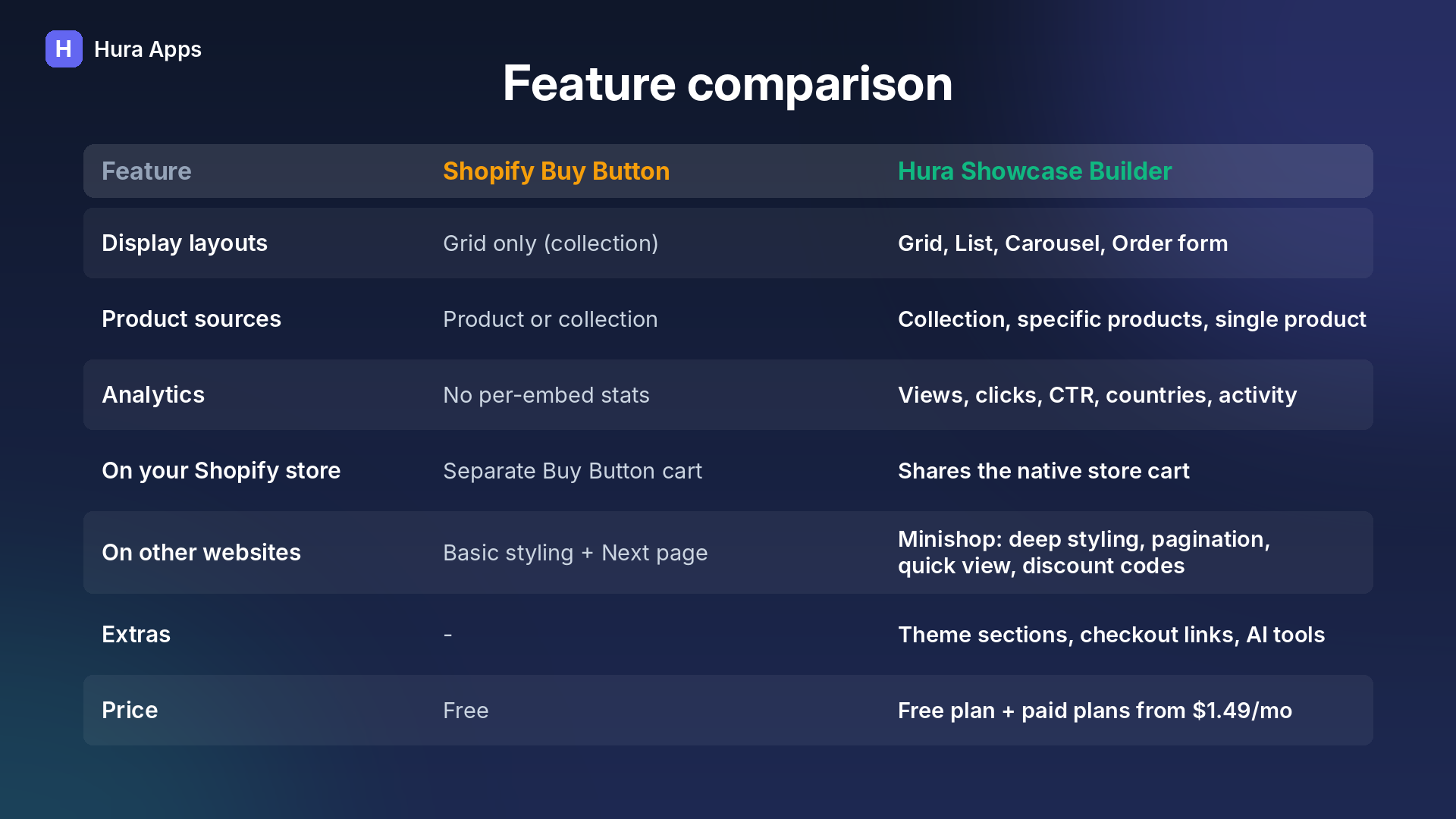
Side-by-side comparison
| Feature | Shopify Buy Button | Hura Product Showcase Builder |
|---|---|---|
| Display layouts | Single product button, or one grid style for collections | Grid, List, Carousel/Slider, Order form |
| Product sources | One product or one collection | Collection, multiple specific products (custom order), single product |
| Setup requirement | Products must be published to the Buy Button channel | Pick a collection or products and go |
| Analytics | No per-embed views or clicks | Views, clicks, CTR, daily chart, countries, activity log |
| Used on your Shopify store | Separate Buy Button cart | Shares the store’s native cart |
| Used on other websites | Basic styling, Next page button | Minishop with deep styling, pagination, quick view, floating cart, discount codes, markets |
| Extras | None | Theme sections, direct checkout links, AI tools, UTM tracking |
| Price | Free | Free plan; paid plans from $1.49/month (analytics on Premium) |
Which one should you choose?
If all you need is a single “Buy” button on a simple page, Shopify Buy Button does the job for free.
If your products live inside content, such as blog posts, guides, landing pages or partner websites, Hura Product Showcase Builder is the stronger tool. You get the right layout for every placement, the freedom to hand-pick products, a cart that stays in sync with your Shopify store, real numbers on what each showcase does, and a minishop that looks like part of the site it lives on.
Get started for free
Hura Product Showcase Builder has a free plan that includes collection and specific product showcases, display on other platforms, and the grid/list, slider and bulk order layouts. Install it from the Shopify App Store, create your first showcase in a few minutes and paste the code wherever your customers read.
Install Hura Product Showcase Builder on the Shopify App Store →