Sell on WordPress vs Hura Product Showcase Builder: Best Way to Sell Shopify Products on WordPress 2027

If you sell on Shopify and run a blog or website on WordPress, 2027 gives you two serious ways to put your products on those pages. Shopify now ships its own Sell on WordPress sales channel with a WordPress plugin, and Hura Product Showcase Builder by Hura Apps lets you embed shoppable showcases and a full minishop on WordPress, on your Shopify store and on any other website.
We installed both on the same Shopify store and the same WordPress site and tested them side by side. Every screenshot below comes from that real setup, so you can see what each tool actually gives you before you commit to one for 2027.
Prefer video? Watch the full comparison with narration:
Quick verdict for 2027
- Sell on WordPress is a solid free option if you only sell on WordPress, you are happy with one product card and a basic collection grid, and you are comfortable editing theme files or CSS for anything beyond that.
- Hura Product Showcase Builder is the better choice if you want multiple layouts (grid, list, carousel, order form), hand-picked product lists, no-code styling, per-showcase analytics, and one tool that works on your Shopify store, WordPress, Wix, Blogger or any HTML page.

Sell on WordPress: what you get
Sell on WordPress is a free sales channel built by Shopify, launched in 2025. It has two parts: a sales channel in your Shopify admin and a Shopify plugin you install on WordPress.
Products must be included in the channel
Like every Shopify sales channel, only products included in Sell on WordPress can be shown. The channel page lists those products and shows total sales and orders that came from WordPress over the last 30 days.

Setup: plugin plus access token
To connect the two sides, you copy a Shopify access token from the channel settings and paste it into the plugin settings on WordPress. The plugin home page then walks you through publishing an optional theme that redirects your Shopify URLs to WordPress, and creating product pages or adding products to blog posts.


Two blocks: one collection, one product
Products are added with WordPress blocks. The collection block lets you pick a collection and set the maximum products per row (up to 6) and per page. Apart from that, the block only offers additional CSS classes and custom CSS.

The product block shows a single product. There is no block for a hand-picked list of products, and no carousel, list or order form layout.

How it looks on the page
On the front end you get a large product card and a simple collection grid with pagination.


Products also sync into WordPress product pages with variant buttons, Add to cart and Buy now, and the cart drawer supports discount codes. This part of the experience works well.


Design changes mean code
The limitation shows up when you want things to look different. The plugin’s Advanced settings say that to customize the product card, collection, quick view popup or product page, you create template files in your theme. In other words, beyond rows and products per page, design changes require PHP and CSS work. Several merchant reviews on the Shopify App Store point to exactly this. And the whole channel only works on WordPress, not on your Shopify store or other platforms.

Hura Product Showcase Builder: what you get
Hura Product Showcase Builder solves the same problem with a no-code editor, more layouts, more product sources and built-in analytics, and it is not limited to WordPress.
1. Three product sources
- Collection showcases: all products from a collection.
- Specific products showcases: any products you pick, in your own order.
- Product showcases: one featured product with a detailed layout.

Specific products are perfect for “best of 2027” lists, gift guides and comparison posts: choose the items and drag them into the order you want.

2. Four layouts, no code
Choose Grid, List, Slider (carousel) or Order form from one dropdown, and check the live preview on desktop, tablet and mobile before you copy the embed code.
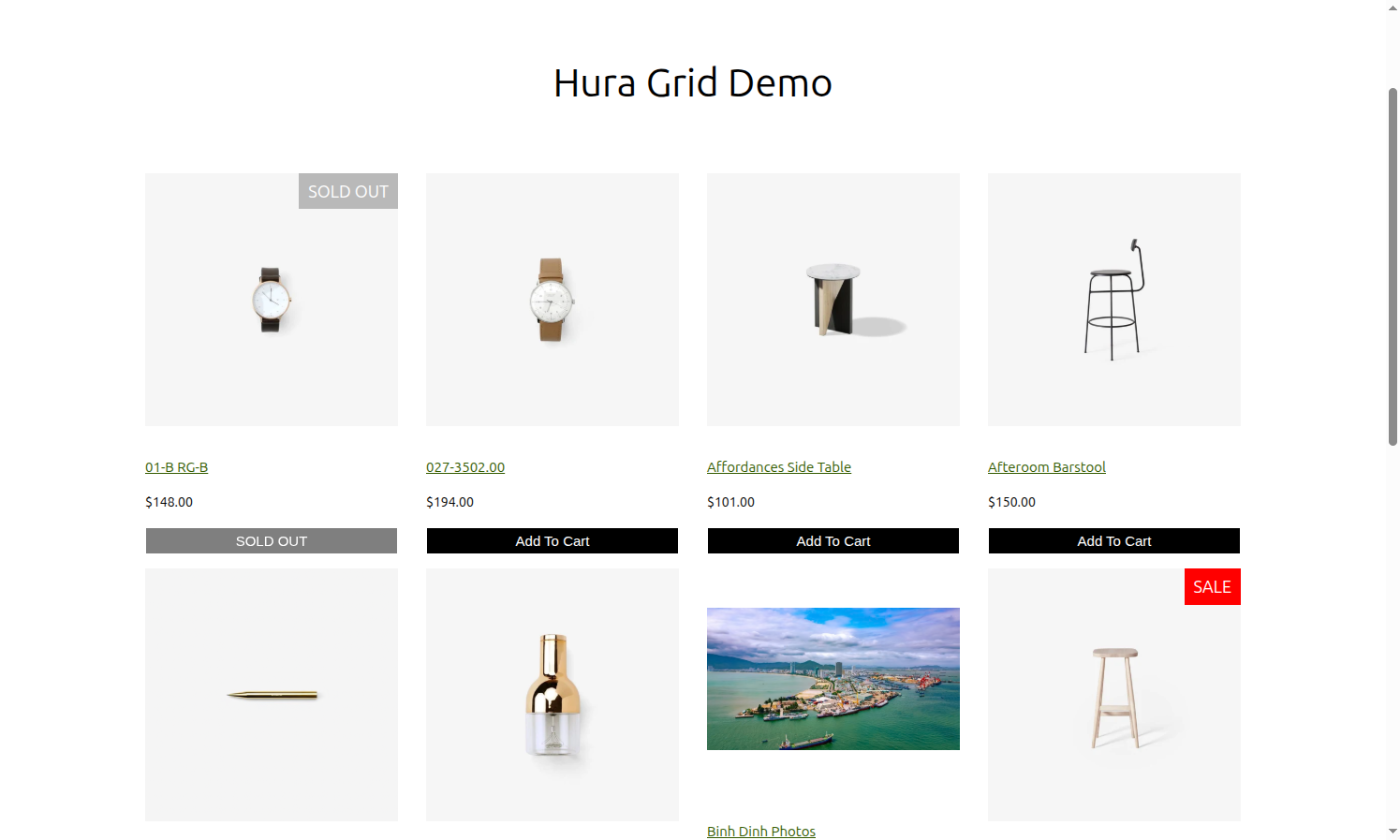
Grid with sale and sold-out labels, variant selection and Add to cart on the card:
Carousel for featured products and new arrivals:

List for larger images and more detail:

Order form with a quantity on every row, ideal for wholesale and repeat buyers:

Button text, colors, font size, behavior after adding to cart, the Load more button and UTM tracking are all set in the editor.

3. Works on your Shopify store with the native cart
Sell on WordPress only covers WordPress. Hura also works inside your own Shopify store: place a showcase in a blog article or a custom page, and Add to cart goes straight into the store’s native cart, together with everything else the shopper picked.


4. Analytics for every showcase
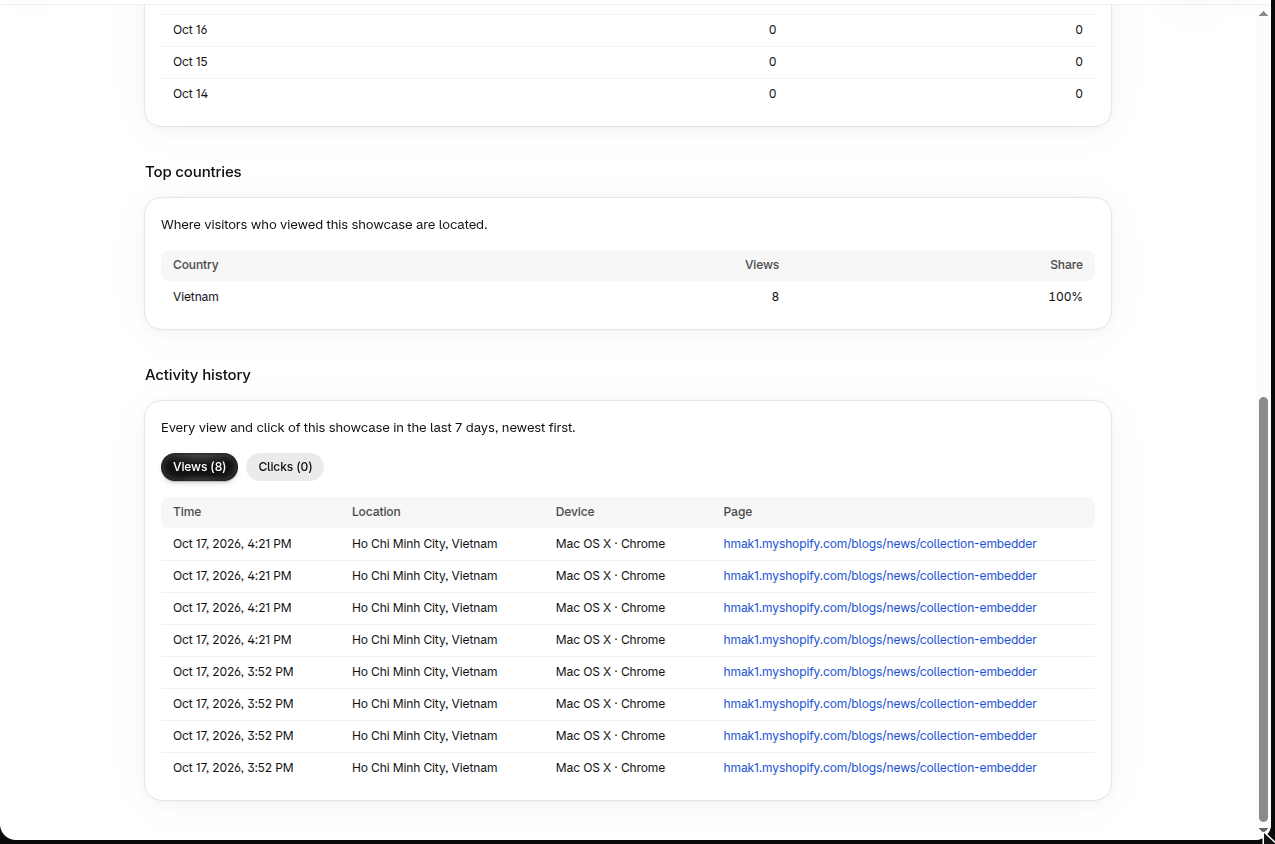
Sell on WordPress reports total sales and orders from WordPress. Hura goes deeper for each individual showcase: views, clicks, click-through rate, a daily chart, top countries and an activity history with time, location, device and the exact page. You see which posts and placements actually drive interest.

5. Minishop: WordPress and any other website
Hura Minishop embeds a complete mini store with one line of code, on WordPress, Wix, Blogger, Joomla or any HTML page. There is no plugin to install and no access token to manage.

Everything is customizable without code:
- Grid, list or bulk order form, with products per row for desktop, tablet and mobile.
- Card style, background, border, radius, shadow, hover effect, image ratio and fit.
- Title, price and vendor styling.
- Quick view or product page, with variant picker and Buy now.
- Floating cart position, size, colors, badge and every cart text.
- Market selection for country-specific prices and language.

It also has pagination, quick view and a floating cart with discount codes:


6. Extras
Theme sections for Online Store 2.0, direct checkout links and AI tools are included as well.

Sell on WordPress vs Hura Product Showcase Builder: side by side
| Feature | Sell on WordPress | Hura Product Showcase Builder |
|---|---|---|
| Where it works | WordPress only (plugin + block editor) | Shopify store, WordPress, Wix, Blogger, any HTML page |
| Setup | Sales channel + WordPress plugin + access token | Create a showcase, paste one line of code |
| Display layouts | Product card, collection grid | Grid, List, Carousel/Slider, Order form |
| Product sources | One product or one collection | Collection, multiple specific products (custom order), single product |
| Design options | Products per row/page; custom CSS or theme template files | No-code styling for cards, buttons, colors, fonts, hover, images and cart |
| Analytics | Total sales and orders from WordPress | Per-showcase views, clicks, CTR, countries, activity log |
| On your Shopify store | Not available | Shares the store’s native cart |
| Synced product pages on WordPress | Yes | Quick view and links to your store |
| Price | Free | Free plan; paid plans from $1.49/month (analytics on Premium) |
Which should you choose in 2027?
Pick Sell on WordPress if WordPress is your only channel, you want Shopify-synced product pages on your WordPress domain, and you have a developer for design changes.
Pick Hura Product Showcase Builder if you want your products to look great inside content without code, need more than one layout, want to hand-pick products for each post, want to know which placements perform, or sell across your Shopify store and several websites. Many merchants also use both: Sell on WordPress for synced product pages, and Hura showcases inside blog posts and landing pages.
Start free
Hura Product Showcase Builder has a free plan with collection and specific product showcases, display on other platforms, and grid/list, slider and bulk order layouts. Install it, build your first showcase in minutes and make every page you publish in 2027 shoppable.
Install Hura Product Showcase Builder on the Shopify App Store →